How to Render Blogs from API Instead of Hardcoding
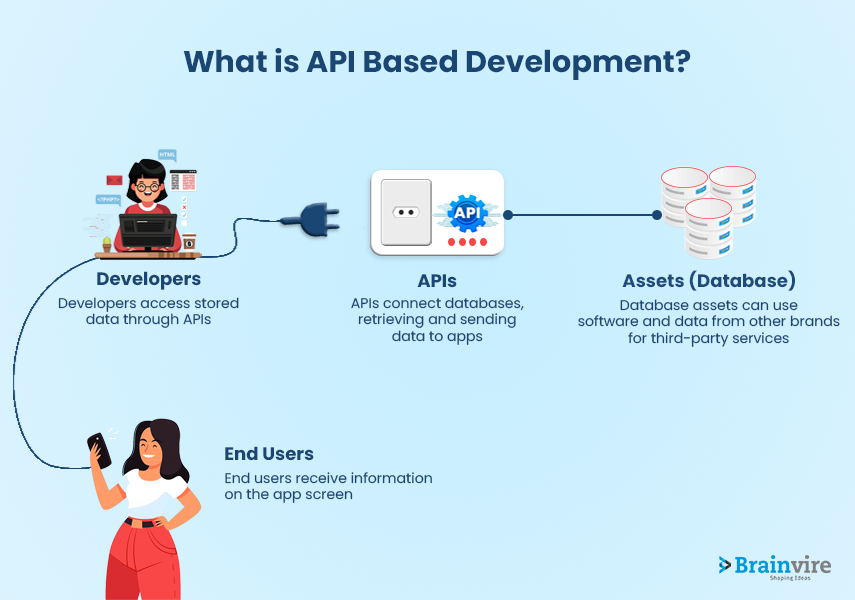
Why Move to API-Driven Blogs?
If your blog content is currently stored directly in src/content/blogs/*.md, it works great for small projects.
But when content grows, a remote API workflow can help you:
- manage posts from a CMS or admin panel
- update content without rebuilding every time
- reuse the same content across web and mobile apps
In this guide, we will move from local hardcoded content to an API that returns markdown posts.
Current Pattern (What You Have Today)
Right now your pages likely use something like:
const posts = await getCollection("blogs");That means Astro reads markdown files from your project directory at build time.
To switch to API mode, we will replace this with HTTP fetches.
Target API Response Shape
First, define a clean API contract. Your backend endpoint (for example /api/blogs) should return an array like this:
[
  {
    "slug": "intro-to-astro-2026-03-07",
    "title": "Intro to Astro",
    "description": "Getting started with Astro",
    "date": "2026-03-07",
    "author": "Raunak Manna",
    "image": "/images/astro/astro-cover.jpeg",
    "markdown": "## What Is Astro?\\nAstro is..."
  }
]
Step 1: Add an API Client Utility
Create src/lib/blogApi.ts:
export interface ApiBlog {
  slug: string;
  title: string;
  description: string;
  date: string;
  author?: string;
  image?: string;
  markdown: string;
}

const BLOG_API_URL = import.meta.env.BLOG_API_URL ?? "http://localhost:4000/api/blogs";

export const fetchAllBlogs = async (): Promise<ApiBlog[]> => {
  const response = await fetch(BLOG_API_URL);

  if (!response.ok) {
    throw new Error(`Failed to fetch blogs: ${response.status}`);
  }

  const blogs = (await response.json()) as ApiBlog[];
  return blogs;
};
Also add .env:
BLOG_API_URL=http://localhost:4000/api/blogsStep 2: Update the Blog Listing Page
In src/pages/blog/index.astro, replace getCollection("blogs") logic with API fetching.
import BaseLayout from "../../layouts/BaseLayout.astro";
import { fetchAllBlogs } from "../../lib/blogApi";

const posts = await fetchAllBlogs();

const sortedPosts = [...posts].sort(
  (a, b) => new Date(b.date).getTime() - new Date(a.date).getTime(),
);
Then render cards from API fields (post.title, post.description, etc).
Step 3: Update Dynamic Blog Route
In src/pages/blog/[slug].astro, build static paths from API slugs:
import { fetchAllBlogs } from "../../lib/blogApi";

export async function getStaticPaths() {
  const posts = await fetchAllBlogs();

  return posts.map((post) => ({
    params: { slug: post.slug },
    props: { post },
  }));
}
Now Astro can still generate static pages, but source content comes from API.
Step 4: Render Markdown from API
Because API returns markdown text, convert it to HTML before rendering.
One common option is marked:
npm install markedThen in src/pages/blog/[slug].astro:
import { marked } from "marked";

const html = marked.parse(post.markdown);
And in template:
<article class="prose max-w-none" set:html={html} />If your markdown comes from external users, sanitize HTML before rendering.
Step 5: Keep Existing UI Components
Good news: your current UI can remain mostly unchanged.
You only need to update data source and field access:
BlogCard.astro: use API object fieldsAlsoSee.astro: use API object fieldsindex.astroand[slug].astro: usefetchAllBlogs()
This keeps design and UX intact while changing content delivery.
Step 6: Handle Fallbacks and Errors
Add defensive checks so pages do not break on API issues:
- show empty state when no posts are returned
- show fallback text when description/image is missing
- fail build clearly when API is unreachable in production builds
Example:
let posts: ApiBlog[] = [];

try {
  posts = await fetchAllBlogs();
} catch (error) {
  console.error("Blog API fetch failed", error);
}
Optional: Hybrid Strategy (Best of Both)
A practical strategy is:
- use API in production
- keep local markdown as fallback in development
This gives reliability during local work while still supporting dynamic content workflows.
Final Migration Checklist
Use this checklist while migrating:
- Create API utility (
src/lib/blogApi.ts) - Add
BLOG_API_URLin.env - Update listing page to use
fetchAllBlogs() - Update dynamic route
getStaticPaths()to use API slugs - Parse markdown string to HTML (
markedor remark pipeline) - Keep existing UI components, only replace data source
- Add fallback and error handling
Final Thoughts
Switching from hardcoded local markdown to API-driven markdown is mostly a data-source refactor, not a UI rewrite.
Your existing Astro pages and design system can stay almost the same. Once this is done, your blog becomes much easier to scale and manage.
If you want, the next step can be adding pagination and category filters directly from API response fields.